
You checked your transits before the conversation you’d been putting off. Saturn squaring your natal Venus. Mars moving through your seventh house. The app gave you a detailed, accurate read of what was happening in the sky – and you closed it still not knowing whether to reach out now or wait another week.
That’s not a knowledge problem. You had the information. What you didn’t have was a translation – from chart data into a concrete answer about timing.
That gap is exactly where Sidera and TimePassages diverge. They speak the same underlying language – Western tropical astrology, the same zodiac, the same planetary cycles – but they are built for different people solving different problems at different points in their relationship with astrology.
Before downloading either app, the question worth asking is not which one is better at astrology. It’s which problem you’re actually trying to solve.
Quick Verdict
Choose TimePassages if your goal is chart study: natal charts with multiple house calculation methods, precise transit descriptions, progressed charts, synastry bi-wheels, composite charts, and a Pro feature set built for users who have astrology vocabulary or are actively building it.
Choose Sidera if your goal is daily timing and practical planning: a ranked calendar built from your birth chart, an AI layer that translates transits into plain-language guidance, and a Find Best Date workflow that answers “when should I act on this?” without requiring chart fluency.
Both apps work from the same Western tropical system. They don’t compete directly – they serve different jobs at different points in the interpretation chain.
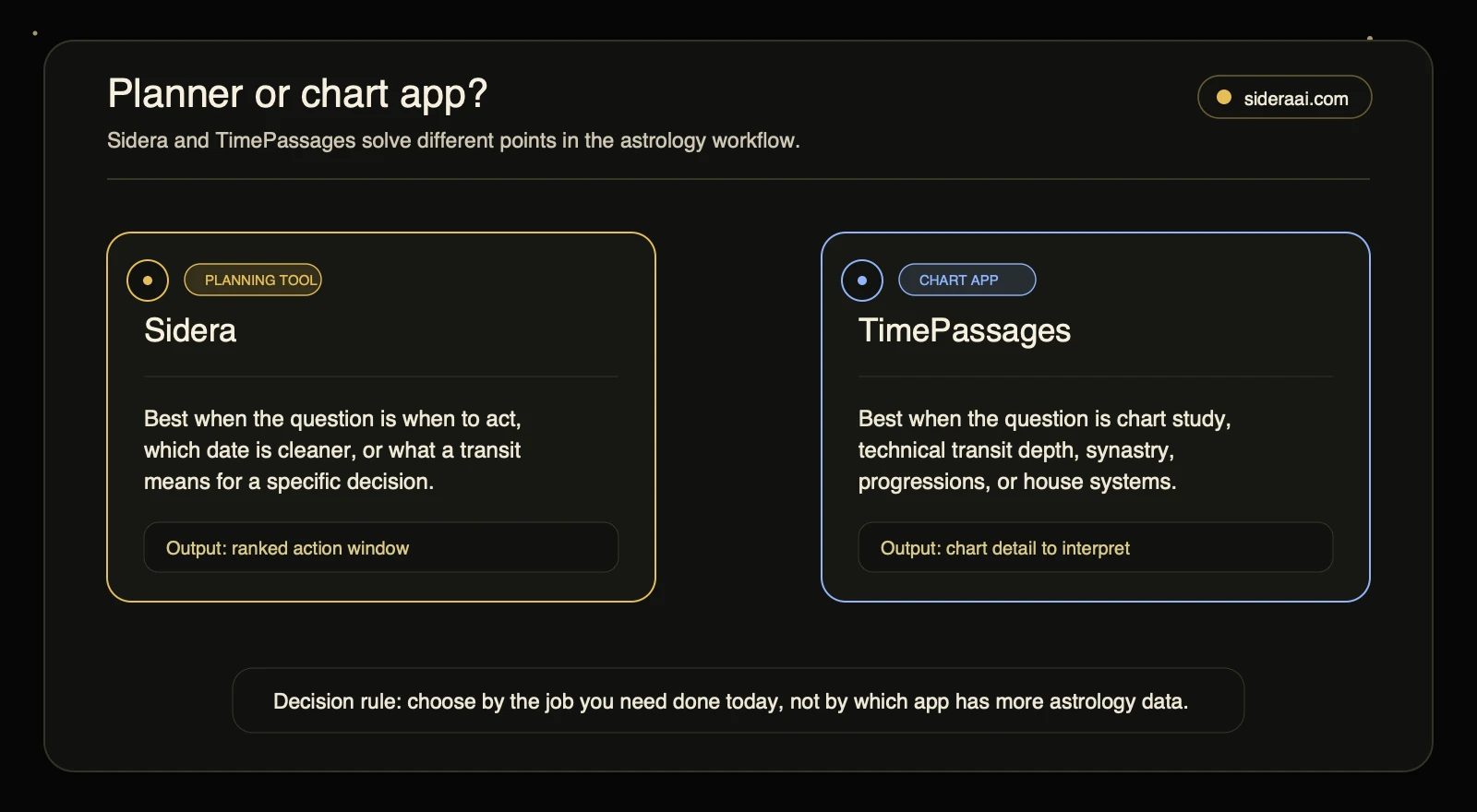
Use the router before comparing feature lists: Sidera is built for action timing, while TimePassages is built for chart study.
What TimePassages Does Best
TimePassages has earned a consistent reputation in the astrology community for technical accuracy and chart depth. Based on its Apple App Store listing, Google Play listing, and AstroGraph’s official product pages (astrograph.com/timepassages, accessed July 2026), the app supports:
- Natal and transit charts with daily personal transit descriptions
- Progressed charts for tracking chart development across months and years
- Synastry bi-wheel and composite charts for relationship astrology
- Compatibility meter for scoring relationship dynamics
- Multiple house calculation methods in the Advanced Edition
- A Pro subscription unlocking expanded chart controls and professional-level tools
What a typical TimePassages session looks like in practice: you pull up your natal chart, check the current transits overlaid on your placements, tap into a transit description for Saturn square Venus, and read a detailed interpretation of how that aspect connects to themes in your natal chart. If you’re studying a synastry chart with another person, you load the bi-wheel, examine the cross-aspects, and work through the compatibility data. The app rewards engagement: the more chart vocabulary you bring to it, the more you extract from what it shows you.
That design is deliberate. TimePassages provides chart data and interpretation at the level of an astrology reference tool. Converting that data into a concrete decision – should I reach out today or wait? – requires the user to close that final step. For learners and practitioners who want depth, that’s the right trade-off. For users who need the output already translated into an action window, it’s where the tool’s job ends.
What Sidera Does Best
Sidera starts from the same underlying data – your birth chart, the current transits, the day’s aspects – and routes it through a completely different interface. Instead of presenting chart information for you to interpret, Sidera converts it into a planning layer.
The core workflows, based on Sidera’s official product description (sideraai.com, accessed June 2026):
- Find Best Date: specify what you’re trying to do and get ranked date windows for action, launches, decisions, or sensitive conversations
- Daily aspect summary: scores the day’s chart weather against your natal placements in plain language, without requiring you to understand what a trine or square means in technical terms
- Cosmic calendar: a month-view ranking showing which days align with which kinds of activity across your chart
- AI astrologer: ask follow-up questions about any transit or aspect and get practical interpretation without chart vocabulary as a prerequisite
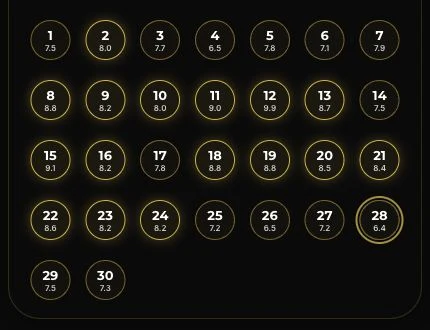
A typical Sidera session unfolds differently: you open the app, see a calendar view ranked by astrological quality for whatever you’re working on, pick a window that aligns with your timing question, and either act on it or ask a follow-up through the AI layer. The chart is doing work in the background; what surfaces at the interface level is the output – ranked days, a quality score, a plain-language summary of why this window is favorable or difficult.
The planning layer is what makes Sidera distinct. Rather than reading a transit description and working out what it means for your week, Sidera does that translation and surfaces the result as an actionable calendar score. For anyone using astrology as a practical decision layer – timing a launch, avoiding a friction window, choosing when to have a difficult conversation – this is a fundamentally different value proposition than chart study.
Feature Comparison
| Area | Sidera | TimePassages |
|---|---|---|
| Primary job | Translate daily chart weather into planning and timing decisions | Study natal charts, transits, progressions, synastry, and technical astrology data |
| Beginner friendliness | Plain-language summaries and AI Q&A | Technical chart vocabulary rewards existing astrology knowledge |
| Chart depth | Natal chart, daily aspects, AI interpretation, ranked calendar | Multiple chart types, house systems, progressions, Pro tools |
| Timing and planning | Find Best Date and activity-ranked calendar are core features | Transits can inform timing; user interpretation required |
| Relationship tools | Timing guidance from your own chart; AI relationship questions | Synastry bi-wheel, compatibility meter, composite charts |
| Best for | Practical planners, daily guidance seekers, decision-makers | Astrology learners, enthusiasts, chart students, practitioners |
For technical relationship astrology – synastry analysis, composite chart work, compatibility scoring – TimePassages leads on depth. Sidera’s relationship angle is about timing: when to have the conversation, when to give space, when to make a move.
What Most Comparisons Miss
Most reviews that cover TimePassages focus on technical accuracy and chart richness. What they rarely separate is the difference between precision and utility.
A precise transit description is not the same thing as actionable guidance. Knowing that transiting Saturn is squaring your natal Venus tells you something meaningful – but it doesn’t tell you whether to send the email today or wait until Thursday, or how to approach the conversation differently depending on which window you pick. That conversion step is left to the user.
What Sidera is automating is the practice of electional astrology – selecting astrologically favorable timing for specific intentions. TimePassages gives you the raw chart data that electional work draws on; Sidera builds the electional workflow directly into the interface, so the output is a ranked calendar you can act on rather than a transit list you have to decode yourself.
This distinction matters because most people searching for an astrology app aren’t searching for chart study software. They want the chart to be useful in daily life without committing to a learning path. TimePassages is the right tool if you want to build that fluency. Sidera is the right tool if you want the output now.
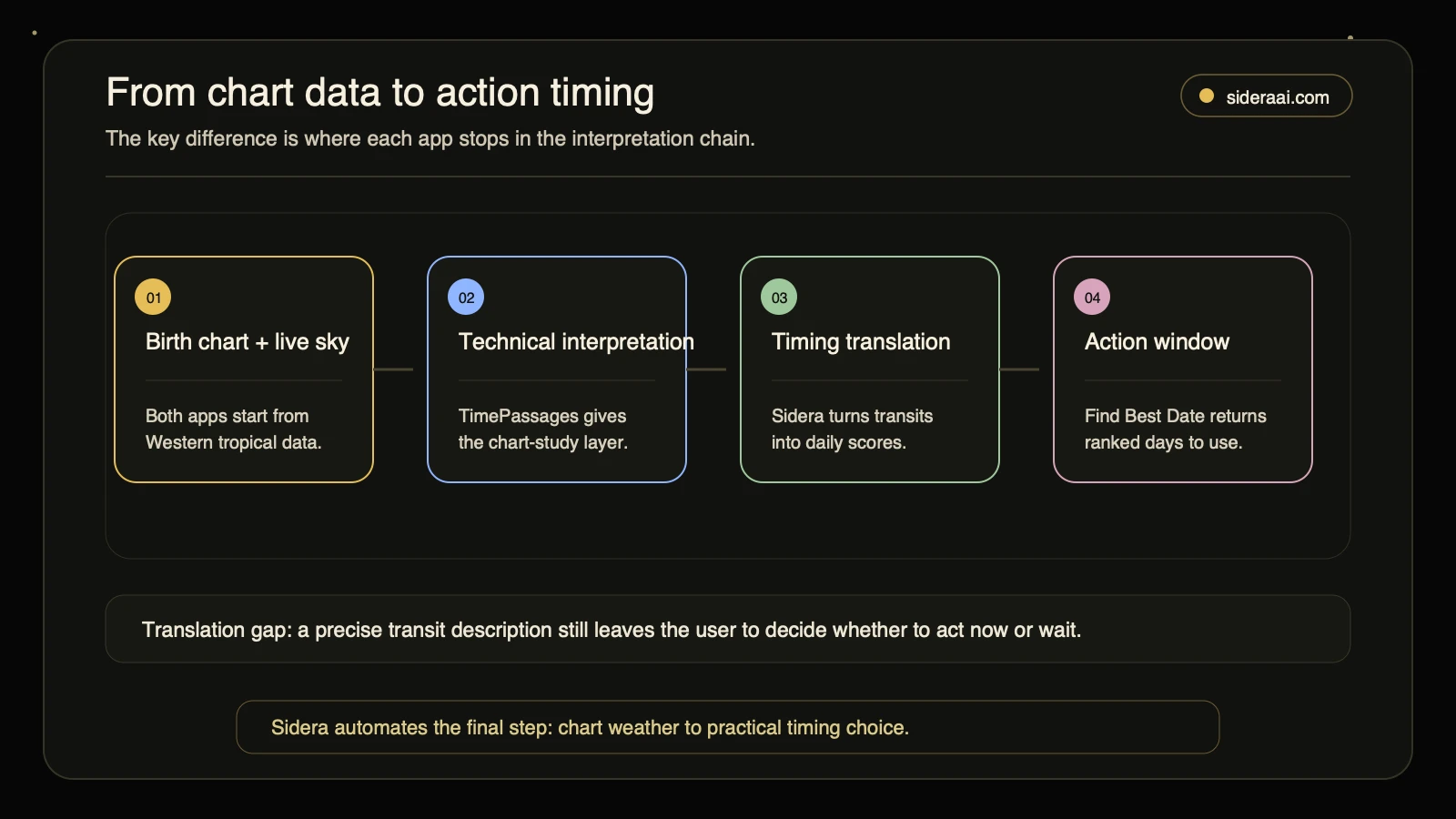
The chain shows the translation gap: TimePassages gives deep chart interpretation, while Sidera carries the same chart weather into a practical timing output.
Original Data
For this comparison, we mapped both apps against a decision rubric based on the actual tasks readers bring to astrology apps:
Where Sidera leads: daily action timing, beginner-accessible AI interpretation, and planner UI. The app is specifically designed to answer the question “when should I do this?” from your birth chart – a workflow that most chart tools leave entirely to the user.
Where TimePassages leads: technical chart study, transit and progression depth, synastry analysis, professional-level tools, and control over house calculation methods. It is better for readers building astrology knowledge over time, or practitioners who need detailed chart controls.
The beginner/advanced split is real. A reader with no astrology background who opens TimePassages faces a vocabulary curve before the app becomes immediately useful. A reader with strong chart knowledge who opens Sidera may want more manual chart controls than the planning interface exposes. Both observations are structural – the apps are designed for different points on that fluency curve, not competing at the same point on it.
The practical implication: if you’re still deciding whether astrology is useful for your daily life, Sidera removes the barrier. If astrology is already a serious practice, TimePassages gives you the tools to go deeper.
Social Listening
Community signals around TimePassages cluster around a consistent theme: transit description accuracy. The qualitative pattern from community research is that the app’s interpretations earn trust specifically with users who have enough chart knowledge to evaluate what they’re reading – and those users describe the experience as unusually precise. The praise is specifically about accuracy, not about ease of translating that accuracy into decisions.
A secondary pattern visible in community discussion: users who have followed TimePassages across versions raise expectations around synastry depth, asteroid feature coverage, and chart wheel readability. These are the signals of a community that holds the app to a high technical standard as it evolves – not dissatisfaction with the core product, but the natural friction of a maturing tool with an engaged, technically demanding user base.
Sidera doesn’t appear prominently in chart-study communities, which reflects its positioning accurately. It’s not competing for “best chart software” reputation. It’s competing for the “what should I actually do today” use case – a daily planning question that most chart tools leave the user to answer alone.
The reader who asks “which day this week is better for starting this project?” and the reader who asks “what does this progression tell me about the next year?” are using astrology for different purposes. Both questions are legitimate. Neither app answers both equally well.
Decision Tree
Use TimePassages if:
- You’re actively studying astrology and want to track your natal chart, transits, and progressions in technical detail
- You need professional-level tools: progressed charts, composite charts, synastry bi-wheels, multiple house calculation methods
- You have enough chart vocabulary to read a transit description and extract a practical interpretation without an AI layer
- You want to compare multiple people’s charts in depth
Use Sidera if:
- You want your birth chart to tell you which day is better for a specific decision, launch, or conversation
- You’re using astrology as a planning layer, not a primary study subject
- You want to ask follow-up questions about transits without learning chart vocabulary first
- The daily question you’re trying to answer is “when?” not “what does this mean theoretically?”
Use both if:
- You’re studying astrology with TimePassages and want daily action guidance layered on top of that deeper knowledge
- You want technical chart depth when you need it, with a practical planning output every morning from Sidera
Because they operate at different points in the interpretation chain, using both avoids real redundancy.
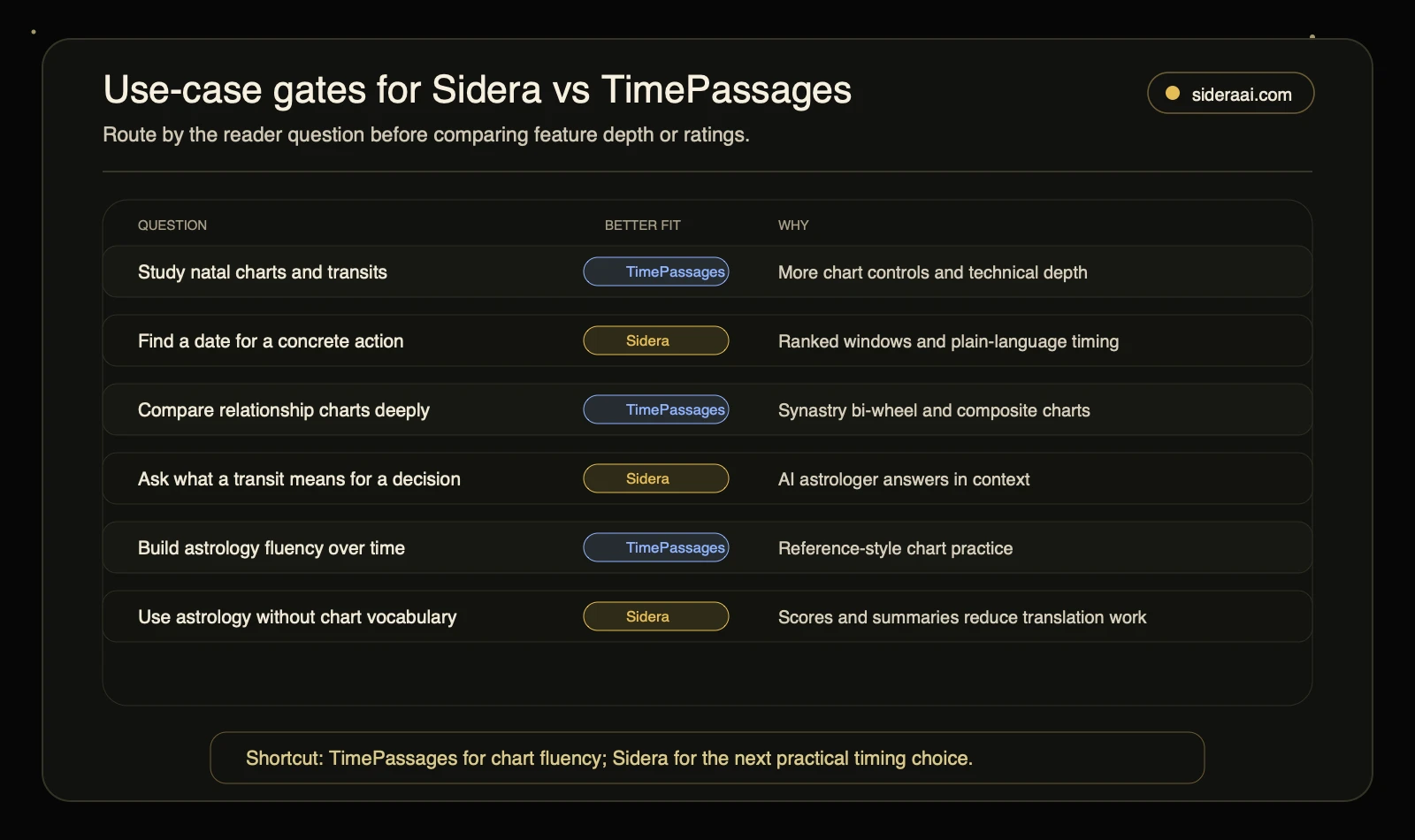
Use the gates as the short version of the decision tree: TimePassages for chart fluency, Sidera for the next practical timing choice.
Editorial Note
The core claim in this article – that Sidera and TimePassages solve different problems – is an editorial observation based on official product descriptions and qualitative community signals, not a quality judgment about either app’s accuracy. TimePassages has a long track record and a technically serious user community. Sidera is making a different bet: that most people who want astrology to be useful in daily life don’t need to study charts to get value from them.
Both approaches are legitimate. This comparison is a rubric for deciding which tool is better for your specific use case, not a verdict on which product is better at astrology.
Methodology Box
Claims about Sidera in this article are based on Sidera’s official product pages (sideraai.com, accessed 2026-06-30), which describe the daily guidance system, Find Best Date workflow, cosmic calendar, and AI astrologer features. Claims about TimePassages are drawn from the Apple App Store listing, the Google Play listing, and AstroGraph’s official product pages (astrograph.com/timepassages/advanced and astrograph.com/timepassages/desktop, accessed 2026-06-30 to 2026-07-01), which describe natal charts, daily transit descriptions, progressed charts, synastry bi-wheel, composite charts, compatibility meter, multiple house systems, and Pro subscription features. Community signals cited in the Social Listening section are qualitative patterns from research, not statistical claims or direct quotes. The Sidera calendar screenshot above is an owned asset used with permission.
Freshness Note
App features, subscription pricing, and Pro tier availability for both Sidera and TimePassages can change between versions. The feature descriptions in this article reflect official product pages as of July 2026. Verify current feature sets and pricing through the respective App Store listings before making a subscription decision.
Frequently Asked Questions
Is TimePassages better than Sidera? They are designed for different jobs, which makes a direct quality comparison the wrong frame. TimePassages is stronger for chart study, technical astrology depth, and professional tools. Sidera is stronger for daily timing decisions, practical planning, and AI-assisted interpretation without chart vocabulary. The question worth asking is which job you’re actually trying to do.
Does Sidera show synastry or relationship charts like TimePassages? Sidera focuses on timing guidance from your own birth chart, including relationship timing windows and AI questions about relationship dynamics. TimePassages offers deeper technical relationship chart tools: synastry bi-wheel, compatibility meter, and composite charts. If detailed technical relationship chart analysis is your primary goal, TimePassages leads on that side.
Can I use Sidera and TimePassages together? Yes, and they complement each other well. TimePassages provides the chart depth and study layer; Sidera provides the daily planning output that translates that depth into action windows. Because they operate at different points in the interpretation chain, using both avoids real redundancy.
What astrology system does Sidera use? Sidera uses Western tropical astrology – the same system used by most Western horoscopes. It tracks the Sun and planets against the tropical zodiac tied to the seasons, not the fixed star positions used in Vedic or sidereal systems.
Is TimePassages good for beginners? TimePassages rewards users who already have astrology vocabulary or who are motivated to develop it. The transit descriptions and chart data are detailed and accurate, but converting that detail into practical guidance requires chart fluency. Sidera’s AI interpretation and plain-language summaries are specifically built to remove that fluency barrier – a deliberate design difference, not a quality gap.
What is Find Best Date in Sidera? Find Best Date is Sidera’s core planning workflow. You specify an intention – launching something, having a difficult conversation, signing a contract, beginning a project – and Sidera analyzes your birth chart against current and upcoming planetary positions to return ranked date windows. It automates what practitioners of electional astrology do manually, without requiring you to understand the underlying chart calculations.
Ready to See Your Personal Birth Chart?
Discover your unique cosmic blueprint — planets, houses, and aspects personalized to your exact birth time and location.
Get Your Birth Chart →✓ Birth chart analysis ✓ Personalized insights ✓ Free to use
Related Sidera Guide
Continue with this closely related guide: